
Auto Clicker - Automatic tap
True Developers StudioTools
4.517.84K Reviews
- Version
- 2.3.0
- Installs
- 100.00M
- Age Rating
- Everyone
Screenshots
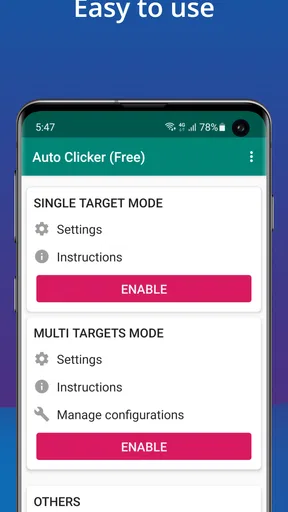
Our Review of Auto Clicker - Automatic tap
 Analysis by Appyee
I judge an auto-tapping tool less by how quickly it can repeat a touch and more by how well it fits the task around it. A tap that works in a simple offline screen can behave differently when an app is loading, waiting on a server, or showing a changing prompt. That is where Auto Clicker - Automatic tap is most useful to think of as a configurable helper, not a way to make every online interaction hands-free.
When the network changes what a tap can do
Repeated taps are predictable only when the screen stays predictable. In a game or service that loads content over the internet, a slow response can leave the app tapping a button that has moved, disappeared, or not yet become available. I would use automation for a stable, repeated action, then watch the screen when the next step depends on a network response.
A practical habit is to begin with a short run and check that the target is still correct before letting the routine continue. This matters particularly for sign-in screens, purchase flows, changing menus, and anything that submits information. An auto tap can repeat a touch; it cannot tell whether the app has finished processing it or whether the screen has changed in a meaningful way.
Fits some mobile routines better than others
The app is a Tools utility from True Developers Studio, and its appeal is straightforward: reduce repeated physical touches on an Android device. It is free to install, has an Everyone age rating, and its current version is 2.3.0. The average rating is 4.6 from around 805,000 ratings, with over 100 million installs. Those figures suggest that the use case is familiar to many people, but the right fit still depends on what you want to automate.
For example, if I were testing a screen that requires the same tap in the same place, I could see the benefit immediately. But for a task involving reading, choosing between changing options, or reacting to a message, a person needs to stay in the loop. Automation is most comfortable when the action is repetitive and the consequence of a missed tap is small.
Recovering when a routine stops matching the screen
Even a well-set interval can become a poor match once an app pauses, displays a prompt, or changes layout. I would stop the sequence as soon as the screen no longer looks as expected, rather than letting taps continue and hoping the interface catches up. This is a small but important difference between using an auto clicker as a convenience and treating it as an unattended robot.
When setting up a routine, keep the first test brief and observe the result. If the action is too fast for the target app to respond, increasing the gap between taps is more sensible than simply restarting the same sequence. A little caution at setup can prevent accidental actions and makes it easier to identify whether the issue is timing or a changed screen.
Be deliberate with data and sensitive actions
Auto-tapping can save effort, but it does not make a task safer or more private by itself. I would avoid leaving it running through screens that submit personal details, confirm purchases, or send messages unless I can supervise every step. The risk is not that the tool understands your information; it is that a repeated touch may activate something you did not mean to confirm.
There is also a useful distinction between tapping and deciding. If a form needs a different answer each time, or a service asks for a one-time confirmation, automation is the wrong shortcut. I find this tool most sensible for low-stakes, repeatable actions where I can verify the outcome without handing control over to a sequence of blind taps.
Who will get the most from it
People who play games with a stable repeated-tap action, test an interface, or have a routine that asks for the same touch again and again are the clearest audience. If you only need to tap a few times, doing it manually is simpler. If the task depends on visual judgment or the screen changes often, a built-in feature in the app—or simply staying in control yourself—is usually the better choice.
The usual alternative is manual tapping, which is more adaptable but tiring for long repetitions. Some apps also include their own repeat or accessibility controls, and those may be a better option when available because they are designed around that particular task. An auto clicker is more general, but that flexibility means you must choose the target and timing carefully.
My connectivity verdict
I would not treat network access as the point of this utility. Connectivity affects the app being tapped: online screens can load at uneven times, while a fixed tap pattern cannot judge whether a server response has arrived. For that reason, I see it as a better fit for steady, visible actions than for workflows that depend on live updates or remote confirmation.
Auto Clicker - Automatic tap has attracted around 18,000 written reviews, and it is free with in-app purchases listed at $1.99 per item. I would start with the free experience and decide whether its controls suit a real task before paying for anything. For repetitive, low-risk taps it can be a practical helper; for unpredictable or sensitive screens, staying hands-on is the smarter choice.
If you've ever found yourself stuck in a repetitive tapping hell while playing a mobile game or using an app, then Auto Clicker - Automatic tap might just be the hero you didn't know you needed. I've spent some quality time with this nifty app, and I'm here to share my thoughts on how it can change your tapping game.
What is Auto Clicker - Automatic tap?
So, let's dive right in. Auto Clicker - Automatic tap is basically your personal tapping assistant. It's designed to automate taps on your screen, which can be a lifesaver if you're dealing with games or apps that require constant interaction. Whether you're trying to level up faster in a game or automate other routine tasks, this app gets the job done without breaking a sweat.
Getting Started with Auto Clicker
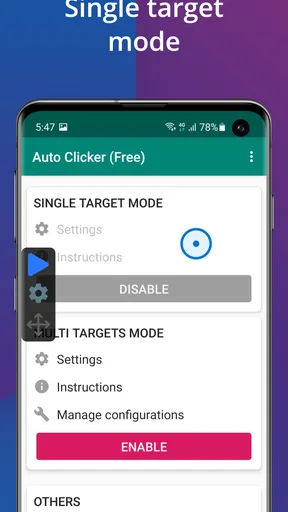
Installing the app is a breeze. Head over to the Play Store or App Store, hit download, and you're good to go. Once you open the app, the user interface is pretty straightforward. You've got options to set up single or multi-target modes, which are perfect for whatever tapping scenario you're facing.
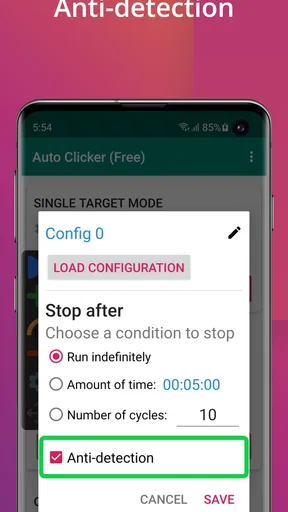
I was particularly impressed by how easy it is to configure. You can adjust the interval between taps and even set up a duration for how long you want the clicking to continue. It's super flexible, letting you tailor everything to your specific needs.
Features That Make Life Easier
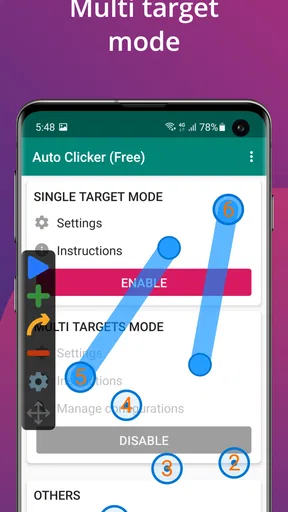
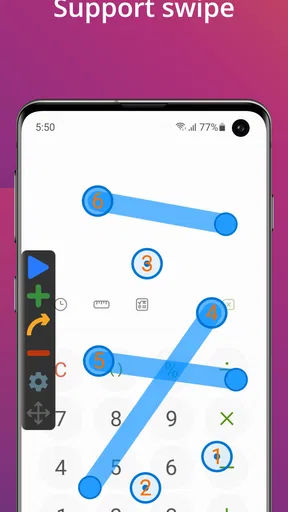
One of the standout features of Auto Clicker - Automatic tap is its ability to handle multiple click points at once. So, if you're playing a game that requires you to tap in different spots, this app can do it all simultaneously. It's like having multiple fingers working in sync on your screen.
The app also runs in the background, which means you can set it up and then switch to other tasks or apps without any hassle. This multitasking capability is a huge win, especially for those who juggle between apps frequently.
Performance and Usability
In terms of performance, I found the app to be quite reliable. The taps are precise, and there's no noticeable lag, which is crucial when you're trying to get that high score or complete a task efficiently. It's worth noting that the app doesn't drain your battery too quickly, so you can use it without worrying about running out of juice.
Setting up the app for the first time might take a little getting used to, especially if you're a newbie to automation apps. But once you've got the hang of it, it's smooth sailing. The app provides a tutorial when you first launch it, which is helpful for understanding the basics.
Potential Uses and Benefits
Auto Clicker - Automatic tap isn't just for gamers. Sure, it's a gamer’s paradise when it comes to automating repetitive tasks, but it can also be a productivity booster for anyone. Imagine using it to automate clicking through long presentations or rapidly opening and closing apps for testing purposes.
For those who often engage in online surveys or tasks that require constant interaction, this app can save you a ton of time and effort. It's a versatile tool that fits into both fun and functional categories.
Final Thoughts
At the end of the day, Auto Clicker - Automatic tap is a handy app that delivers on its promise of making your tapping tasks effortless. With its user-friendly interface, robust features, and reliable performance, it's a great addition to your app arsenal. Whether you're a hardcore gamer or someone looking to streamline your mobile experience, this app is worth checking out.
So, if you're tired of repetitive tapping and want to make life a little easier, give this app a try. You might find it becomes one of your go-to tools for optimizing your mobile interactions.
Verdict
Strengths of Auto Clicker - Automatic tap
- Easy to set up and use interface.
- Supports multiple click configurations.
- No root access required for use.
- Customizable click intervals.
- Works on both Android and iOS.
Limitations of Auto Clicker - Automatic tap
- Can drain battery quickly.
- Intermittent ad interruptions.
- Limited support for older devices.
- May not work with all apps.
- Occasional stability issues.
Similar Picks in This Category
View All
Google LLC4.0

Gboard - the Google Keyboard
Google LLC4.5

Google Play services
Google LLC4.3

Google Play Store
Google LLC4.9

Files by Google
Google LLC4.5

SHAREit: Transfer, Share Files
Smart Media4U Technology Pte.Ltd.4.3
Frequently Asked Questions
What is Auto Clicker - Automatic Tap and how does it work?
Auto Clicker - Automatic Tap is a utility app designed to automate repetitive tapping on your device's screen. It works by allowing users to set specific intervals and durations for taps, which can be useful for games or apps requiring frequent clicks. The app helps save time and effort by performing these tasks automatically.
Is Auto Clicker - Automatic Tap safe to use on my device?
Yes, Auto Clicker is generally safe to use. However, it is crucial to download it from a reputable source like the Google Play Store or Apple App Store. Ensure you review app permissions before installation to avoid potential security risks. Always keep your device's software updated to the latest version.
Can Auto Clicker be used with any application or game on my device?
Auto Clicker is compatible with most applications and games that allow screen interactions. However, some games or apps may have anti-cheat mechanisms that detect automated inputs, potentially resulting in account suspensions or bans. Always check the terms of service of any app or game before using automation tools.
Does Auto Clicker require root access on Android devices?
No, Auto Clicker does not require root access on Android devices. The app is designed to function without needing to modify your device's system settings. This makes it accessible to a wider range of users who prefer not to root their devices.
Are there any limitations or drawbacks to using Auto Clicker?
While Auto Clicker is useful for automating repetitive tasks, it may not work seamlessly with all apps due to individual app restrictions or updates. Additionally, excessive use of automated taps could be flagged by some platforms, leading to potential issues. It's important to use the app responsibly and in compliance with app guidelines.
